Apple may be working on an overhaul of its iTunes Store and App Store, according to 9to5Mac. Due to growing competition from music streaming services like Spotify and the growing popularity of Amazon’s online music store, the redesign of the iTunes Store is considered “a top priority for Apple.” The Cupertino-based company is looking to simplify the service and deliver a more user-friendly interface than the one afforded by its current design. The redesign will reportedly simplify content discovery, and it will “make the iTunes Store a much more engaging experience.” The revamped stores are reportedly scheduled to launch later this year.
Showing posts with label iTunes. Show all posts
Monday, February 20, 2012
Apple may launch revamped iTunes Store, App Store later this year
Apple may be working on an overhaul of its iTunes Store and App Store, according to 9to5Mac. Due to growing competition from music streaming services like Spotify and the growing popularity of Amazon’s online music store, the redesign of the iTunes Store is considered “a top priority for Apple.” The Cupertino-based company is looking to simplify the service and deliver a more user-friendly interface than the one afforded by its current design. The redesign will reportedly simplify content discovery, and it will “make the iTunes Store a much more engaging experience.” The revamped stores are reportedly scheduled to launch later this year.
Thursday, February 16, 2012
How To Sync Your iOS Device With Multiple iTunes Libraries
A new jailbreak app called MultiTunes lets you sync with multiple iTunes libraries on your iOS device. Apple limits you to one iTunes library at a time by default, and while iCloud and iTunes Match make it easier to access your music from anywhere, some would still like to sync with different libraries without deleting all locally stored music first. That’s where MultiTunes saves the day.
The developer warns new users:
When you change libraries and open iTunes, you’ll be prompted to “set up” your iOS device again. Don’t freak out, this doesn’t mean that all your info is about to be replaced. Simple add a name for your device again (just keep it the same) and everything will look normal in iTunes, minus your empty Music app library. Your device will need to be authorized with another iTunes account to transfer purchased, DRM-protected music, but you should be able to add tunes over smoothly otherwise.
If you want to go back to your original library, simply open MultiTunes again and select it. Your Music app will be switched back to its original state instantly and your device’s library will show up like normal in iTunes again. Remember that you’re using onboard device storage for these different libraries, so be wary of your capacity when syncing back and forth.

The developer warns new users:
“Before downloading content from iTunes or App Store apps, make sure your default library is selected in this app. Otherwise, your content may not download properly.”MultiTunes is really easy to use, and it’s a perfect way to sync music from different iTunes libraries. When you open the jailbreak app on your iOS device, create as many different libraries you want. When you select a different library, open the Music app and you’ll notice that you have either no music or an entirely different collection, depending on whether you’ve synced with iTunes or not.
When you change libraries and open iTunes, you’ll be prompted to “set up” your iOS device again. Don’t freak out, this doesn’t mean that all your info is about to be replaced. Simple add a name for your device again (just keep it the same) and everything will look normal in iTunes, minus your empty Music app library. Your device will need to be authorized with another iTunes account to transfer purchased, DRM-protected music, but you should be able to add tunes over smoothly otherwise.
If you want to go back to your original library, simply open MultiTunes again and select it. Your Music app will be switched back to its original state instantly and your device’s library will show up like normal in iTunes again. Remember that you’re using onboard device storage for these different libraries, so be wary of your capacity when syncing back and forth.
Related articles
- uploaded tracks not streaming or downloading in iTunes, iOS unaffected (tech-gadget.co.in)
- iTunes Match replacing some explicit rap songs with censored versions, Apple working on a fix (tech-gadget.co.in)
- Wants Answers From Apple On Apps Stealing Address Book Contacts (tech-gadget.co.in)
- Apple Launches iTunes Store in Latin America, iTunes Match in Brazil (tech-gadget.co.in)
- iTunes Match rolls out to international community, makes music lovers flinch (tech-gadget.co.in)
Friday, February 3, 2012
uploaded tracks not streaming or downloading in iTunes, iOS unaffected
All is not well with Apple's iTunes Match service at the moment — songs that users have uploaded to the service are unavailable for streaming or downloading. You can still stream and download music that was "matched" with content in the iTunes Store, but you can't access unmatched music unless the local file is available on your computer. Strangely enough, this problem appears isolated to the iTunes client itself; when we tested iTunes Match on iOS devices, all uploaded and matched songs are able to be downloaded without issue.
Related articles
- Apple Launches iTunes Store in Latin America, iTunes Match in Brazil (tech-gadget.co.in)
- iTunes Match replacing some explicit rap songs with censored versions, Apple working on a fix (tech-gadget.co.in)
- VEVO App Update Adds Video Match Service (tech-gadget.co.in)
- Facebook reportedly in talks to replace YouTube as host of VEVO music videos (tech-gadget.co.in)
- iTunes Match rolls out to international community, makes music lovers flinch (tech-gadget.co.in)
iTunes Match replacing some explicit rap songs with censored versions, Apple working on a fix
Apple's had its issues over censorship before, but none quite so... explicit. Cult of Mac is reporting that the "clean" versions of certain rap songs are being played over the iTunes Match cloud streaming service, even when the profanity-laced originals are stored on disk in the iTunes library. The issue only seems to affect a few tracks, including Jay-Z's Can I Live and Kanye West's Power, and 9to5Mac says Apple has acknowledged the problem and promised a fix. Hip-hop heads may have to wait a little longer to have their minds corrupted, though as far as we know, Marilyn Manson records remain unaffected.

Related articles
- iTunes Match launches in 19 additional countries (tech-gadget.co.in)
- iTunes Match rolls out to international community, makes music lovers flinch (tech-gadget.co.in)
- Apple Launches iTunes Store in Latin America, iTunes Match in Brazil (tech-gadget.co.in)
- VEVO App Update Adds Video Match Service (tech-gadget.co.in)
- Apple launches Boxing Week iTunes music promotion in the Americas and Europe (tech-gadget.co.in)
Thursday, January 19, 2012
What the Latest iTunes Update Failed to Fix
Today Apple unveiled a suite of new features aimed at bringing education into the iPad era: the iBooks 2 app, iBooks Author, textbooks in the iBookstore, and the iTunes U app. Accompanying these new apps and upgrades is the iTunes 10.5.3 update, which lets you take advantage of all the new features.
Apple has updated a lot of products to great effect over the years, but somehow iTunes always comes up short whenever upgrades roll around. iTunes Match and Wi-Fi syncing, two features introduced with iTunes 10.5, are fantastic steps in the right direction, severing our dependency on the easily misplaced USB cable, as well as the need to constantly sync and update multiple devices so they hold the same digital content.
For the most part, however, iTunes is a mess to look at, and a hassle to navigate.
We know that 10.5.3 is an incremental iTunes update, but it got us thinking about a few areas in drastic need of improvement. Here are our top three iTunes gripes that we hope Apple will fix in iTunes 11.
Even worse: The way iTunes is currently laid out is a mess. The App Store landing page has 11 different sections of featured apps, and it seems there’s a half-dozen ways to navigate to the very same pages.
We know Apple developers can create clean, intuitive interfaces — it’s, well, what they do. Just look at the sublimely simple iOS interface, or the multitude of Apple-built iOS and Mac apps that are straightforward and pleasant to use. iTunes needs a major overhaul in usability, content discovery, and general, overall simplicity. Banish those tiny icons! Give me a big, beautiful magazine spread of content I have, and new stuff I can buy.
Ping was a great idea. iTunes has more than 160 million users, many of whom are dedicated music fans. Surely they would want to communicate with each other, explore and discover new music with one another, and interact with their favorite artists.
That was the intent of Ping, but the feature just didn’t click. Ping’s Twitter integration is nice for finding friends and colleagues — assuming they’re the sort of people whose music-buying habits you’d like to follow or emulate. But artist involvement on the service is lackluster, and the lack of Facebook integration has been a glaring omission. If Ping could mesh with our Facebook likes and tap into our friend feeds, it might offer value. But currently it’s just another sad example of another social network that never was.
I’m sorry Ping, but it’s time to be quietly laid to rest — right next to MobileMe.
First, if you’ve got music tracks from a variety of sources — burned CDs, purchased songs, Best Of albums — you’re bound to run into duplicate songs, and it’s a pain to recognize and eliminate these dupes, especially if the versions are slightly different. It would be great if iTunes could instantly recognize duplicates, and prompt users with the option to delete the older or lower quality versions.
Second, iTunes (like most Apple products) doesn’t always play nice with non-Apple-sanctioned content. Some users still have issues with iTunes not recognizing songs that weren’t purchased from directly within the software. These could be tracks burned from CDs, but saved in incompatible file formats or bearing incompatible tag information. Offending files fail to transfer to iTunes song libraries, or appear to transfer correctly, but don’t sync to attached iPhones and iPods. Worst of all: When tracks fail to transfer or sync, iTunes provides no explanation of what went wrong.
Third, users have issues with Apple’s iTunes Match service, which launched in mid-November. For songs that have counterparts that could be “matched” with existing iTunes content, a number of users have found iTunes Match uploads the user’s version rather than just using the matched version, making the upload process excruciatingly long. Indeed, lengthy sync times are often cited as a major complaint of iTunes in general.
iTunes is an incredible piece of software. Collecting your entire music, video and apps library in a single place, and offering a dead-easy purchasing platform, is no easy feat. But this is Apple we’re talking about, and we expect much more from a company that’s built its reputation on interface simplicity and “it just plain works” design.

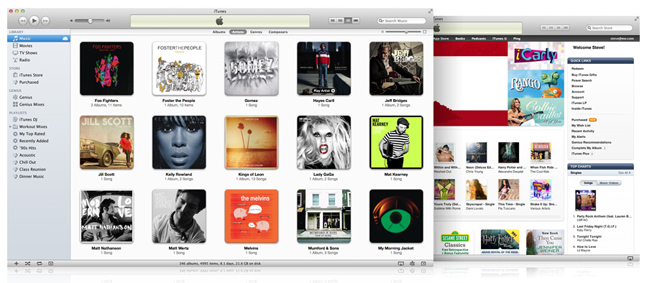
Apple has updated a lot of products to great effect over the years, but somehow iTunes always comes up short whenever upgrades roll around. iTunes Match and Wi-Fi syncing, two features introduced with iTunes 10.5, are fantastic steps in the right direction, severing our dependency on the easily misplaced USB cable, as well as the need to constantly sync and update multiple devices so they hold the same digital content.
For the most part, however, iTunes is a mess to look at, and a hassle to navigate.
We know that 10.5.3 is an incremental iTunes update, but it got us thinking about a few areas in drastic need of improvement. Here are our top three iTunes gripes that we hope Apple will fix in iTunes 11.
A Messy Interface
There is a lot going on in iTunes. It manages all sorts of different media, from music, books, and TV shows to the apps on your iPhone, and the App Store itself (in the desktop version). The media density is so rich, in fact, each unique section in the iTunes Store requires its own full-fledged landing page with highlighted and featured content to differentiate hot selections from long-tail back catalogs. And then, of course, you’ve got your own library of content to deal with. It’s a lot to parse through.Even worse: The way iTunes is currently laid out is a mess. The App Store landing page has 11 different sections of featured apps, and it seems there’s a half-dozen ways to navigate to the very same pages.
We know Apple developers can create clean, intuitive interfaces — it’s, well, what they do. Just look at the sublimely simple iOS interface, or the multitude of Apple-built iOS and Mac apps that are straightforward and pleasant to use. iTunes needs a major overhaul in usability, content discovery, and general, overall simplicity. Banish those tiny icons! Give me a big, beautiful magazine spread of content I have, and new stuff I can buy.
A Service No One Wants or Needs
Nobody uses Ping, Apple’s social network for music discovery, except for (apparently) Phil Schiller.Ping was a great idea. iTunes has more than 160 million users, many of whom are dedicated music fans. Surely they would want to communicate with each other, explore and discover new music with one another, and interact with their favorite artists.
That was the intent of Ping, but the feature just didn’t click. Ping’s Twitter integration is nice for finding friends and colleagues — assuming they’re the sort of people whose music-buying habits you’d like to follow or emulate. But artist involvement on the service is lackluster, and the lack of Facebook integration has been a glaring omission. If Ping could mesh with our Facebook likes and tap into our friend feeds, it might offer value. But currently it’s just another sad example of another social network that never was.
I’m sorry Ping, but it’s time to be quietly laid to rest — right next to MobileMe.
Confusing Music Management
Overall, iTunes is a fantastic program for organizing and managing music, but it does suffer significant problems in a few areas.First, if you’ve got music tracks from a variety of sources — burned CDs, purchased songs, Best Of albums — you’re bound to run into duplicate songs, and it’s a pain to recognize and eliminate these dupes, especially if the versions are slightly different. It would be great if iTunes could instantly recognize duplicates, and prompt users with the option to delete the older or lower quality versions.
Second, iTunes (like most Apple products) doesn’t always play nice with non-Apple-sanctioned content. Some users still have issues with iTunes not recognizing songs that weren’t purchased from directly within the software. These could be tracks burned from CDs, but saved in incompatible file formats or bearing incompatible tag information. Offending files fail to transfer to iTunes song libraries, or appear to transfer correctly, but don’t sync to attached iPhones and iPods. Worst of all: When tracks fail to transfer or sync, iTunes provides no explanation of what went wrong.
Third, users have issues with Apple’s iTunes Match service, which launched in mid-November. For songs that have counterparts that could be “matched” with existing iTunes content, a number of users have found iTunes Match uploads the user’s version rather than just using the matched version, making the upload process excruciatingly long. Indeed, lengthy sync times are often cited as a major complaint of iTunes in general.
iTunes is an incredible piece of software. Collecting your entire music, video and apps library in a single place, and offering a dead-easy purchasing platform, is no easy feat. But this is Apple we’re talking about, and we expect much more from a company that’s built its reputation on interface simplicity and “it just plain works” design.
Related articles
- Apple Launches iTunes Store in Latin America, iTunes Match in Brazil (tech-gadget.co.in)
- iTunes Match rolls out to international community, makes music lovers flinch (tech-gadget.co.in)
- iTunes Match launches in 19 additional countries (tech-gadget.co.in)
- Google, Apple and the war for your cloud loyalty (goandroid.co.in)
Wednesday, December 14, 2011
Apple Launches iTunes Store in Latin America, iTunes Match in Brazil
Apple has announced they’re rolling out the iTunes Store to Brazilian and a number of Latin American countries, including Argentina, Bolivia, Chile, Colombia, Costa Rica, Dominican Republic, Ecuador, El Salvador, Guatemala, Honduras, Nicaragua, Panama, Paraguay, Peru and Venezuela.
iTunes in the Cloud is available today for free in Brazil and Latin America and iTunes Match is available today for a $24.99 annual fee in Brazil.Brazil before Canada or the UK? Oh Apple, you tease. Hit the source for the full press release from Apple. Any Brazilian or Latin American readers excited to finally be included in the Apple ecosystem?
The iTunes Store in Brazil offers over a thousand movies to rent or purchase, with many in stunning HD, from major studios including 20th Century Fox, Paramount Pictures, Sony Pictures Home Entertainment, Universal Pictures, The Walt Disney Studios and Warner Bros. Pictures. The iTunes Store in Brazil now joins the revolutionary App Store™, which offers more than 500,000 apps to consumers in 123 countries, reaching hundreds of millions of iPad, iPhone and iPod touch® users around the world. Customers have downloaded more than 18 billion apps to date.
Related articles
- Available apps across major mobile platforms approach million-app milestone (tech-gadget.co.in)
- iTunes 10.5.2 update adds improvements to iTunes Match (tech-gadget.co.in)
Monday, December 12, 2011
iTunes 10.5.2 update adds improvements to iTunes Match
Apple has updated iTunes to version 10.5.2, fixing an audio distortion issue when playing or importing specific CD types as well as adding improvements to itsiTunes Match service.
What’s new in iTunes 10.5.2
iTunes 10.5.2 includes several improvements for iTunes Match and fixes an audio distortion problem when playing or importing certain CDs.
Apple has been vague on the improvements included to their iTunes Match service, so let us know if you see any specific changes in the comments. You can grab the update from the Apple Software Update Utility or as a direct download from the website
Related articles
- APP OF THE DAY: Dragon's Lair (Android & iOS) (tech-gadget.co.in)
Subscribe to:
Posts (Atom)


