Showing posts with label Windows. Show all posts

Saturday, February 18, 2012

Microsoft releases update to postpone expiration date of Windows 8 Developer Preview


Microsoft has released an update that will postpone expiration date of Windows 8 Developer Preview and Windows 8 Server Developer Preview.


Windows 8 Developer Preview was set to expire on March 11, 2012, Windows 8 Server Developer Preview was set to expire April 8, 2012. But after you install this update, the expiration dates for bothe these operating systemw will be postponed to January 15, 2013.

Do note that you must install this update before the expiration date. After the activation license expires, Windows 8 Developer Preview will restart every 2 hours initially and every 1 hour later on.

You can install the update via your Windows Updates or head over to KB2671501 to download it.

If you have liked this post, you might want to check out some more, on topics like Windows 8,Windows Updates.

Friday, February 17, 2012

Microsoft Windows 8 new Metro style logo announced


Microsoft officially confirmed the new branding for its Windows 8 operating system today. The new Windows logo, a play on the company's internal Metro design, will be used across the upcoming Windows 8 operating system. We saw images of the logo leak earlier this week, but the company unveiled it officially today stating that the logo is a Window rather than the traditional flag found in earlier versions of Windows. "We wanted the new logo to be both modern and classic," says Microsoft's Sam Moreau.

The logo uses flat colors and clean lines and shapes to convey the message of Metro and will change color based on the core theme color used in Windows 8. "When you change your color, the logo changes to reflect you," explained Moreau. Microsoft will use the logo in the new charms bar for Windows 8, adopting the chosen theme accent color. We are expecting to see the new logo in the Windows 8 Consumer Preview, due on February 29th.

Tuesday, February 14, 2012

Windows 8 app name requirement for Windows Store developers


Microsoft revealed some additional details about its Windows Store certification process this week. The biggest change is that developers will have to pick a unique name for Windows 8 apps, preventing others from using an identical name to create a fake application, as we have witnessed on the Windows Phone marketplace — we countedover 70 apps using the CNN name and logo recently. The company's Windows Store will debut later this month alongside a Windows 8 Consumer Preview, and developers can opt to reserve a name for their application prior to its completion, ensuring it remains unique for its entire life in the Windows Store.

Developers will be able to submit applications under a six step process, designed to validate and test a Windows 8 Metro style app. Pre-processing (one hour) checks the necessary developer account and paperwork, followed by a number of security tests (three hours) to protect against viruses and malware. Microsoft's third and fourth steps involve technical (six hours) and content compliance (five days) where the company checks the app adheres to content and technical policies. Following a successful test, the app will then move into a release stage before it's signed and published in the Windows Store (two hours). The entire process length will vary per app but the average certification time, based on Microsoft's example, is around six days.

Microsoft uses a similar system for Windows Phone apps, but the company does not support unique app names. Microsoft decided to change this for Windows 8 apps so that consumers can find apps reliably, admitting that the company "needed to ensure that all apps had a unique name." Details are light on the app name reservation system, but we certainly hope this won't lead to squatters holding back fellow developers.


Friday, February 10, 2012

This week at Microsoft: Office 15, Windows 8, and Zune

It’s been quite a week in the world of Microsoft, with news coming in on a dozen fronts. We’ve had a hard time keeping it all straight, so you must be spinning. We’re going to fit our favorites stories into this post, but if you want the full scoop, head to the archives.
Now, as always, ensure that you are following  Tech Gadget on Twitter, and Facebook, and let’s dig into the news. There is, after all, much to get to. As a side note, we’re going to include a huge tract of Microsoft’s notes on Windows 8 in this post. This is to bring you new information in its most unadulterated fashion. You’ll see why.

The Big Windows 8 Unveil

We’ve been working on the issue of ARM-based Windows 8 machines for so long, that you must be tired of it. Happily, after endless prodding on our end, Microsoft gave an interview on the topic, acknowledging that the market has been asking questions. We don’t like to overtoot our in-house horn, but we think that our writing had something to do with that.
We could summarize for you, but in all honesty, Microsoft provided a tl;dr of its own post that we cannot improve upon. So, we are going to bring to you here. Enjoy:
  • Windows on ARM, or WOA, is a new member of the Windows family that builds on the foundation of Windows, has a very high degree of commonality and very significant shared code with Windows 8, and will be developed for, sold, and supported as a part of the largest computing ecosystem in the world. We created WOA to enable a new class of PC with unique capabilities and form factors, supported by a new set of partners that expand the ecosystem of which Windows is part.
  • WOA PCs are still under development and our collective goal is for PC makers to ship them the same time as PCs designed for Windows 8 on x86/64. These PCs will be built on unique and innovative hardware platforms provided by NVIDIA, Qualcomm, and Texas Instruments, with a common Windows on ARM OS foundation—all running the same Windows OS binaries, a unique approach for the industry. PC manufacturers are hard at work on PCs designed from the ground up to be great and exclusively for WOA.
  • Metro style apps in the Windows Store can support both WOA and Windows 8 on x86/64.Developers wishing to target WOA do so by writing applications for the WinRT (Windows APIs for building Metro style apps) using the new Visual Studio 11 tools in a variety of languages, including C#/VB/XAML and Jscript/ HTML5. Native code targeting WinRT is also supported using C and C++, which can be targeted across architectures and distributed through the Windows Store. WOA does not support running, emulating, or porting existing x86/64 desktop apps. Code that uses only system or OS services from WinRT can be used within an app and distributed through the Windows Store for both WOA and x86/64. Consumers obtain all software, including device drivers, through the Windows Store and Microsoft Update or Windows Update.
  • WOA can support all new Metro style apps, including apps from Microsoft for mail, calendaring, contacts, photos, and storage.WOA also includes industry-leading support for hardware-accelerated HTML5 with Internet Explorer 10. WOA will provide support for other industry-standard media formats, including those with hardware acceleration and offloading computation, and industry-standard document formats. In all cases, Microsoft seeks to lead in end-user choice and control of what apps to use and what formats to support.
  • WOA includes desktop versions of the new Microsoft Word, Excel, PowerPoint, and OneNote.These new Office applications, codenamed “Office 15”, have been significantly architected for both touch and minimized power/resource consumption, while also being fully-featured for consumers and providing complete document compatibility. WOA supports the Windows desktop experience including File Explorer, Internet Explorer 10 for the desktop, and most other intrinsic Windows desktop features—which have been significantly architected for both touch and minimized power/resource consumption.
  • With WOA you can look forward to integrated, end-to-end products—hardware, firmware and WOA software, all built from the ground up. Building WOA has been an ongoing engineering effort involving Microsoft, ARM licensees, PC makers, and developers of components and peripherals. These efforts spanned a wide array of subsystems that have been newly created or substantially re-architected for WOA. Partners will provide WOA PCs as integrated, end-to-end products that include hardware, firmware, and Windows on ARM software. Windows on ARM software will not be sold or distributed independent of a new WOA PC, just as you would expect from a consumer electronics device that relies on unique and integrated pairings of hardware and software. Over the useful lifetime of the PC, the provided software will be serviced and improved.
  • Around the next milestone release of Windows 8 on x86/64, a limited number of test PCs will be made available to developers and hardware partners in a closed, invitation-only program. These devices will be running the same branch of Windows 8 on x86/64 as we release broadly at that time. These are not samples or hints of forthcoming PCs, but tools for hardware and software engineers running WOA-specific hardware.
  • The Windows Consumer Preview, the beta of Windows 8 on x86/64, will be available for download by the end of February. This next milestone of Windows 8 will be available in several languages and is open for anyone to download.

Office 15

In its coverage of Windows 8, Microsoft put out a video that detailed various elements of the operating system. In doing so, it wittingly (we assume), leaked a sheaf of details on Office 15, the coming edition of the Office suite. Office 2010 has been a smash hit for Microsoft, but the world of touch is a new frontier.
Our own Matthew Panzarino weighed in on the leak: “The new Office looks to be a much cleaner and crisper version of the industry standard productivity app than many of us were hoping for. Despite jokes about how poorly the classic ‘Ribbon’ interface would translate to tablets, this new version actually looks pretty great.” I agree.
After you look at the images, leave a comment with your perspective, we need more opinions:
12 This week at Microsoft: Office 15, Windows 8, and Zune
21 This week at Microsoft: Office 15, Windows 8, and Zune
31 This week at Microsoft: Office 15, Windows 8, and Zune
4 This week at Microsoft: Office 15, Windows 8, and Zune

Zune

Zune is dead. We think. And we think that it’s actually really dead this time. The problem with Zune is that it never seems to die. Despite existing on life support, Microsoft has yet to pull the plug. However, we think that the end is in sight, at last:
Later today, the last piece of the ‘Zune is probably dead’ puzzle came out: Microsoft is set to demo the Windows 8 Consumer Preview (and probably distribute it) on February 29th. At the Mobile World Congress. Windows Phone 8 leaks, Windows 8 leaks, and a huge Windows 8 event at a mobile event? It seems that Microsoft is set to demo the connectivity of Windows 8 and Windows Phone 8 at the event. In short, we will likely see the app that Windows 8 will use to talk to Windows Phone 8, and it sure as hell should not be Zune.
And that will be, essentially, the end of Zune. Unanchored from Windows Phone, it’s just the orphan project that never found a home. Oh, and whatever app Windows Phone 8 and Windows 8 use, we assume it is coming to Xbox, squeezing Zune out of that niche as well.
Zune is then just a music app with a subscription system that never took off, so far as we can tell. Hell, I’ll miss Zune. But if we have to move on, can we get on with it?
We apologize for this post being as quote heavy as it is, but some weeks require it. It’s Friday, friends, so we hope you close Twitter and make a proper Martini tonight. Tech can wait. Have a great weekend.

Apple Doesn’t Need To Worry About Windows 8 On ARM, But Android Does

Microsoft released a number of important details about its plans for Windows 8 on Arm (WOA) tablets. WOA tablets will focus on having a long battery life as well as being light, thin, and inxpensive. They will feature some traditional Windows elements but have a focus on the Metro interface pioneered on Windows Phone and included as the default on all Windows 8 machines. They can be thought of as Microsoft’s response to the iPad, which will certainly be their biggest competition.
Not surprisingly, many of the first pieces discussing the announcements to hit the media have struck on the “Apple should be worried” theme and have used the fact that WOA tablets will include the major Microsoft Office apps to backup that assumption.
It’s a foregone conclusion that Microsoft will shake up the tablet market when Windows 8 ships, which is expected to be sometime before the end of this year, with both WOA tablets and Windows 8 tablets built around more traditional PC hardware like x86/x64 processors. Microsoft says that all Windows 8 flavors will ship around the same time.
Although WOA tablets had been announced as part of Microsoft’s overall Windows 8 strategy, very little information was availavle before yesterday. Here’s a recap of the major points from the WOA announcement made by Windows President Steven Sinofsky.
  • WOA will ship only on WOA tablets – no install media that could be used to run it on other hardware
  • WOA will only run the built-in apps included by Microsoft and those designed around Windows 8′s new Metro interface and sold through the Windows Store – no legacy apps, x86 emulation, no way to port traditional Windows apps to the platform
  • Microsoft will work closely with manufacturers to ensure a consistent hardware experience that is designed to have a consumer electronics feel rather than a PC feel
  • The Metro interface and experience will be the same one WOA devices as Windows 8 PCs and tablets
  • The Windows desktop, oriented around a touch experience and the Metro UI, will be available with some Windows elements like the Control Panel, Taskbar, and Windows Explorer
  • Desktop and fully function versions of Word, Excel, PowerPoint and OneNote that are optimized for touch will come pre-installed
It’s clear that Micorosft is making an effort to deliver a true mobile experience on WOA devices and that it has taken some tactics from Apple’s playbook when it comes to being much more hands on with the hardware design (as is the case with Windows Phone), with moving away from legacy apps to develop a better mobile experience, and in using an app store model.
Will that be enough to be a true iPad competitor? Probably. I think the overall effort will result in a more refined user experience than is found on most Android tablets – largely because of the concerted effort towards an integration between hardware, OS, and applications. That integrated user experience is what makes the iPad (and other Apple products) as excellent and successful as it is.
One piece of the puzzle that many pundits are seizing on as the iPad-killing feature is the inclusion of full featured versions of Office. As nice as that will be as a feature, it seems to miss the point that there are some really solid Office alternatives available for the iPad. Quickoffice, Documents to Go, and Office2 are all excellent options (better than iWork in several respects). That makes it hard to see Office alone as a way WOA can outshine the iPad.
Will WOA devices push the iPad out of the tablet space? No. Microsoft is pretty late getting to this party. The iPad’s installed base, the diversity of app options, and the integration with Apple’s ecosystem mean that Microsoft is going to need to come with something much more spectacular to get a significant number of iPad owners to switch.
While WOA may attract some potential iPad buyers, how many will really be up to how the hardware performs, how it’s priced, and on the app ecosystem that Microsoft is able to create – all of which are pretty much unknowns at this point.
Quite frankly, WOA devices are going to be the new netbook. I can see them impacting traditional PC and Android tablets long before that make a significant dent to the iPad. In fact the truly integrated design and user experience focus that Microsoft is going with will stand out more significantly compared to Android and positioning WOA tablets as Android tab killers much more than iPad killers.

Thursday, February 9, 2012

Kinect for Windows: Not for consumers, yet


The idea of Kinect for Windows is something that we have been bullish on here at TNW since before the hardware was officially announced. Motion and voice control, added to the ever powerful keyboard and mouse setup? Yes please, we’ll take two helpings.

Now that the Kinect for Windows hardware is technically for sale, we’ve put in some effort to get our hands on a demo unit, but have been gently rebuffed thus far. However, the ever connected Paul Thurrott did get his hands on a device, and hasextensively written up his impressions. This post is designed to make a single point; if you want more, read Paul’s review.

Here’s the core element that you need to understand about Kinect for Windows: if you are not a developer, interested in building apps that take advantage of the Kinect’s capabilities, hold off on buying one. You can’t actually do anything with the Kinect for Windows device except look at it, or code for it.

Also, you won’t get any sort of handholding from Microsoft if you do buy one. In the box there is not a line of code. You have to snag that from Microsoft’s website. Microsoft does have a warning on its Amazon page: “The sensor unit does not ship with any software, and will only operate with an application developed for Kinect for Windows,” but I wonder how many people will notice it.

Here’s the rub: Kinect for Windows is taking its first steps. Sadly, like a toddler, it still can’t do very damn much. Just to give you a picture of the future, imagine the power of Kinect coupled with the coming Windows Store. It’s a match made in heaven for innovation.

Tuesday, February 7, 2012

Few Casual Games Coming To Windows 8 Store Revealed


This is not an exclusive from us! Similar to Windows Phone marketplace, Windows 8 will have Windows Store which will of course feature games category in them. Here is a list of casual games that will come to Windows 8 store when launched later this month,
Cut the rope
Beards & Beaks
Tentacles
geoDefense
Sudoku
Minesweeper
Full House Poker
Zombies
Zero Gravity
Wordament
Toy Soldiers
Pinball FX 2
Rise Of Glory
ilomilo
iBlast Moki

I’ll update the list as I collect more of these

Sunday, February 5, 2012

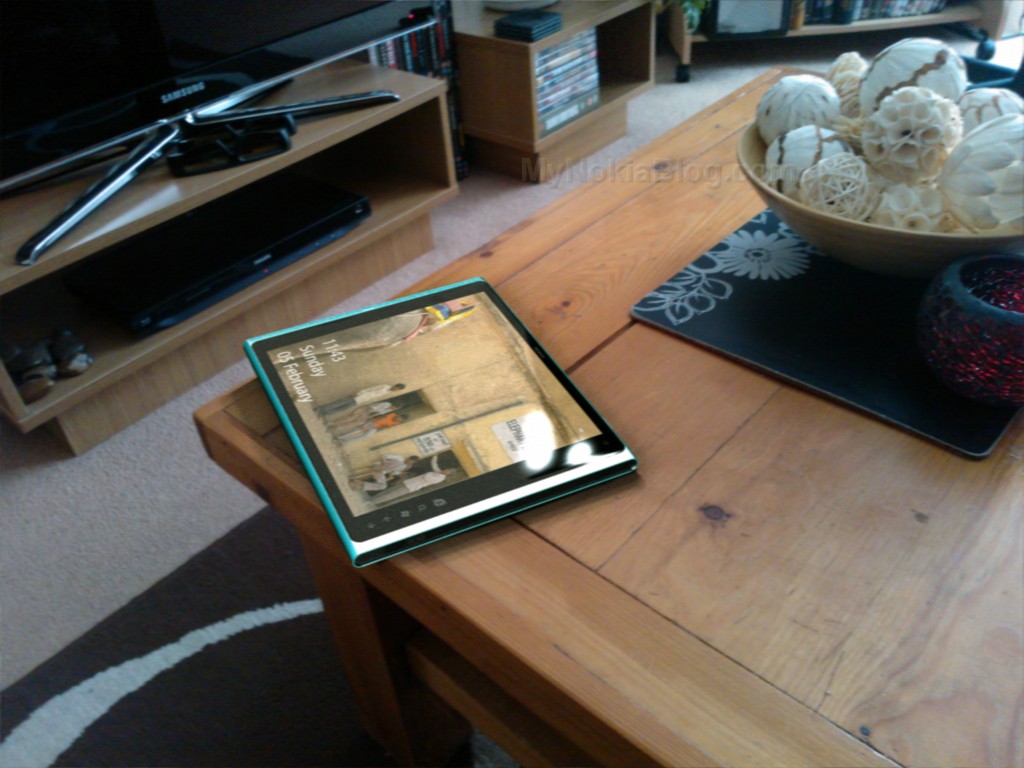
Nokia Lumia ‘Coffee’ Tab Windows 8 concept

My Dream Nokia  is another Nokia tablet design. This one as a few of the others has the N9/Lumia style design but this one reminding me of the N8 too (perhaps the black ends on the blue edges?). This design is by Tristan who wanted to have a bit of fun speculating on what the tablet might look like. Check it out with those Nokia Purity in-earphones. The scattered coffee beans are a nice touch  .
The camera isn’t in the middle but in the top left corner (so not impeded I guess when held in landscape with two hands). I’m not sure if those buttons are hardware or appear with the Windows 8 swipe. There’s even a nice picture below where its set in natural surroundings.
  • Lumia coffee tab
  • 1.4GHz cpu
  • 512Mb ram
  • 16/32/64Gb storage
  • 9.7 AMOLED clearblack display (1280×800)
  • 8Mp Rear camera, 2Mp front facing camera
  • Windows 8 tablet edition
  • Wifi/3G connectivity

About “My Dream Nokia”

I'm sure you've dreamt up your PERFECT Nokia device/UI. What it would look like, what it would feel like, what features it would have. Why don't you share it with the world? Or at least with other Nokia fans  .
It could be your own photoshopped or rendered work (seriously, you dont need mega skills in either, basic paint job is often enough to convey a concept) of your dream product.


Xbox Live no Longer Exclusive to WP?


Microsofts heavily rumored plan to bring Xbox Live games to platforms other than Windows Phone is a reality.

While the company would not reveal specific plans, a Microsoft spokesperson all but confirmed them by telling Inside Mobile Apps while the Xbox Live experiences and games always work best on the Windows platform, we understand that some Xbox fans may be using other types of devices. To satisfy that need, we are working to extend a few of our Xbox experiences and titles to other platforms.


Rumors Xbox Live games would no longer be a Windows phone exclusive began to pick up steam in early January, when LiveSide and Business Insider spotted a job description for a developers with iOS and Android experience to bring the latest and greatest gaming and entertainment experience to mobile platforms including Windows Phone, iOS and other mobile platforms.

When asked about when the same Xbox Live experience available on Windows Phone would be available for iOS and Android, the company remained tight-lipped, saying we are laser-focused on providing the best mobile Xbox Live experience to our customers, regardless of platform.

While Microsoft currently advertises Windows Phone as the only phone with mobile office, Xbox Live, mobile app, and more its clear Microsoft is focusing on extending its console gaming business into the mobile lucrative mobile market, with the release of iOS versions of Xbox Live and its first-party game Kinectimals in December.

Microsoft would not reveal specific revenue figures or user numbers for either app, only stating My Xbox Live and the ‘Kinectimals companion experience have both been well received by iOS users.


Friday, February 3, 2012

Desktop Apps Would Be Bad News for Windows 8 Tablets

At Microsoft's Build conference, Michael Angiulo, corporate vice president of Windows Planning, Hardware and PC Ecosystem, displays a prototype Windows 8 tablet. Photo: Microsoft
Windows 8 represents a huge departure for Microsoft.
First, the platform is slated to run on both x86 processors for PCs, and on ARM chips for tablets. Second, it’s a single OS platform with two distinctly different user interfaces. You’ll be able to divide your time between the touch-optimized Metro, which borrows its look, feel and navigation from the Windows Phone OS, and a traditional Windows 7-like desktop experience.
On desktop PCs, this dual-interface approach shouldn’t be a problem. Metro doesn’t demand many resources. It should run on PCs just fine.
But there’s still a nagging question: How will legacy desktop applications run on ARM-based tablets, if they run on ARM at all? Desktop apps can be resource hogs, and ARM-based tablets may not have the horsepower to run these programs quickly and elegantly. Not only could application performance suffer, but desktop apps could also suck battery capacities dry.
Well, a bit of clarity is maybe, possibly emerging. A Thursday report says Microsoft might allow a limited number of Windows 8 desktop apps to run on ARM-based tablets.
Microsoft is considering “a restricted desktop for Windows 8 ARM,” sources at The Verge say. Applications would have to earn special certification, and would likely be limited to Internet Explorer and Microsoft Office. This jibes with reports that Microsoft has been working on a lighter-weight version of Office for tablets.
We asked Microsoft to clarify, and received a “no comment.” However, past statements from Windows lead Steven Sinofsky suggest ARM tablets won’t support the desktop component of Windows 8.
“We’ve been very clear since the very first CES demos and forward that the ARM product won’t run any X86 applications,” Sinofsky said to investors at a financial analyst meeting in September. “We’ve done a bunch of work to enable a great experience there.”
So how do developers feel? Alexandre Brisebois, a senior .Net developer at RunAtServer, thinks it would be best for Microsoft to offer the same Metro and desktop interfaces everywhere, on both x86 and ARM devices. Conversely, Darren Baker, the business development director at Sogetti Global (a company that makes custom Windows products for businesses), says offering a desktop interface of any kind could be problematic for new tablet users.
“People would buy an ARM tablet, and think they have this copy of MS office that’s going to run there, but it won’t,” Baker says.
Nonetheless, the Windows 8 dual user interface scheme does offer Microsoft and hardware companies a chance to rethink the tablet space as it exists today. This could lead to a tablet that’s both interesting and well-integrated with other Windows products.
“You’re actually going to see tablets that are focused on a specific kinds of tasks: video acceleration for media, or you have legacy app compatibility for desktop users,” Baker says. “It’s not really about the tablet itself. It’s about what you can enable with the tablet.”
Baker used a theoretical United Airlines app as an example scenario for different use cases:
“If they develop an app for end users, it’s going to be ‘I need to use this to get information quickly, then move on with my life.’ They will develop an app for the Metro UI. It’ll launch, get you flight details, and then you can go on to what you want to do next. If an app’s geared toward someone who’s sitting at a desk, they may not need the Metro UI at all, just the desktop interface. Then they could just have a Metro tile that gives you Metro information as needed.”
With the beta of Windows 8 coming out later this month, Microsoft’s tablet plans should soon be revealed. But for now, only one things’s for sure: Regardless of whether the desktop U.I. will appear on ARM tablets, Windows 8 tablets will offer a dramatically different alternative to Apple and Android tablets.

Thursday, February 2, 2012

Skype for Windows offers Group Screen Sharing


You know, video conferences are no longer something as simple as sitting in front of your webcam, while making sure you do not get up from your seat because you do not want to be caught in a situation where your colleagues see you as wearing only half a suit. Skype has been a game changer where live video conferences are concerned, aided by the ever faster bandwidth which we enjoy these days, of course. One of the latest features of Skype for Windows (version 5.8) would be the introduction of the Group Screen Sharing feature – where as its name suggests, you can now share your photos and presentations with your contacts in a video conversation.

This sharing process will work in a presentation with up to 10 people. max, and Group Screen Sharing is available only with Skype Premium. Of course, when you have Skype Premium, it would also mean lumping together Group video calling and live chat customer support. Anyone out there in an enterprise situation who is mulling over the idea of upgrading the office’s machines to cater for Skype for Windows 5.8 now?


Stunning Windows 8 watch concept

Concepts come and concepts go – but some of them leave more of an impression on us than the rest. Here, we have the Windows 8 watch concept that certainly seems to hail from a distant
future. After all, the angled edges add a more masculine look to the portable timepiece, and with Mithun Darji’s (of Ahmedabad, India) imagination, the Windows 8 user interface seems to slot in pretty well with the rest of the physical form factor. This concept wearable timepiece will come with Wi-Fi connectivity as well as phone support, and you need not be like Dick Tracy by talking to your watch, but rather, use a Bluetooth headset since Bluetooth support is thrown into the mix as well. Additional hardware specifications include a quartet of music transport keys, a couple of volume keys and another four different keys. Will Microsoft one day see whether such a concept is worth realizing in the corporeal world? After all, there are already Android-inspired watches from Google…

Friday, December 9, 2011

ASUS to debut display swiveling ultrabook in 2012?


A few days ago we reported that according to a rumor, future ultrabooks could be seeing touch screen functionality. As to whether that will be a feature many will be looking forward to remains to be seen, and it appears to further corroborate those rumors, Digitimes has once again come forward and stated that according to their sources, ASUS will be debuting a new ultrabook in June at Computex 2012 that will feature touch screen capabilities.
It seems that their sources have revealed to them that ASUS is planning an ultrabook for 2012 that will not only be powered by Intel’s new Ivy Bridge processor, but will run on Windows 8 while featuring a swivel based design (as pictured above). This design would allow the ultrabook to transform into a tablet running on Windows 8 with touch screen functionality.
Given how ultrabooks were meant to bridge the gap between bulky laptops and tablets, if this rumor is true, ASUS could very well be blurring those lines with their ultrabook/tablet hybrid. Will this piece of rumor come to fruition? We guess we will have to wait. Until then taking this with a grain of salt is probably just what the doctor ordered.

Thursday, December 8, 2011

Kobo to develop Metro-style apps for Windows


While Kobo doesn’t seem to have an eBook reader for the Windows Phone operating system yet, it looks like the company already has plans for the Windows 8 version of its app. The company recently announced on its blog that it will be developing Metro-style apps for Windows 8, so those of you who plan to pick a Windows 8 tablet won’t have to worry about not having the Kobo reader on the device. Now how about Kobo release an official app for all the Windows Phone users out there? Who here users Kobo over the competition (i.e. Kindle, Barnes & Noble, Google Books et) when it comes to reading eBooks?

Monday, December 5, 2011

Windows 8 heading for irrelevance in 2012? I don’t buy the hype


Market research group IDC is making waves today, as ZDNet picked up its musings on the future of Windows 8 in the coming year, and whether or not it will find relevance in that time frame. IDC is not convinced that it will do so, saying that “Windows 8 Will Launch with Split Success,” and making the claim that:
Windows 8 will be largely irrelevant to the users of traditional PCs, and we expect effectively no upgrade activity from Windows 7 to Windows 8 in that form factor.
Given the massive bet that Microsoft is making on Windows 8, harsh words as the above tracts from IDC are hardly encouraging.
There is an important question that has yet to be answered: Will the ‘Metro,’ tiled interface that will be a part of every Windows 8 SKU function well in a keyboard-and-more environment, or will it only be workable with your fingers? This matters as if the tablet GUI that Microsoft has put into Windows 8 is difficult to use without a touchscreen, the most important addition to its new operating system will not operate well on nearly every device it ships with (that statement assumes that non-touch enabled laptops and monitors remain the norm for some time yet).
Therefore, if the new UI isn’t snazzy on a desktop or laptop that doesn’t support touch, who is going to upgrade to Windows 8 if its main draw is moot? Sure, Windows 8 will sell well on new computers (catastrophe discounted), but what of the upgrade cycle that IDC maligned?
I have two things to say on the matter: Primarily, I expect Microsoft to solve the issues that are currently present in Windows 8′s touch interface that make using a mouse with it frustrating. That and I anticipate that developer activity around the so-called ‘Metro’ apps that Windows 8 will support should be strong enough to provide an incentive for consumers to upgrade who might have needed a bump forward, and perhaps even draw some currently contented Windows 7 users along as well; in short, I expect Windows 8 to enjoy a normal upgrade ‘wave,’ though perhaps less powerful than what Windows 7 enjoyed (due to the weakness of Vista).
Therefore, will Windows 8 be irrelevant? I don’t see how it can be, as those ‘traditional PC users’ who buy new machines will in fact buy Windows 8, and the upgrade cycle will begin far before the holiday sales season. Windows 8 will with all likelihood not cause a globe-splitting stir, but it certainly, so far as I can reason it, will not be a write off. And I mean that for both consumers and the technology world.
Looking ahead just a touch, the Windows 8 beta will help answer the questions that we are currently grappling with. If it does not address these issues, it will indicate a lack of focus, or understanding, by Microsoft on the critical point that Windows, all of it, has to sing on the desktops that consumers currently own if it wants to be a revolutionary actor.